
Podcasts as a learning medium
Podcasts are an increasingly popular learning medium that enables flexible, location-independent education. According to recent studies, around 45% of people listen to podcasts at least occasionally, and usage is even higher among adolescents and young adults. Knowledge and educational podcasts in particular are among the most popular formats, as they present complex content in an understandable way and are easy to integrate into everyday life. They can be accessed anytime and anywhere — whether on the go, during sports or during breaks — and enable individual learning at your own pace. Learners can listen to, pause, or rewind content repeatedly to understand it better, and by simply listening, they can also absorb knowledge on the side. Schools, universities and companies can use podcasts in a targeted manner and thus create a modern, versatile addition to traditional teaching methods — to make this easier, we have integrated a podcast generator into Learn-With.AI.
Podcast in Learn-With.AI Create at the Push of a Button
With Learn-With.AI Can high-quality Educational podcasts Generate automatically in just a few minutes. The AI Learning Platform offers a simple and flexible way to create your own podcasts, which are ideal for teaching, exam preparation or imparting knowledge. Thanks to intelligent AI Learning content can be created and optimized efficiently:
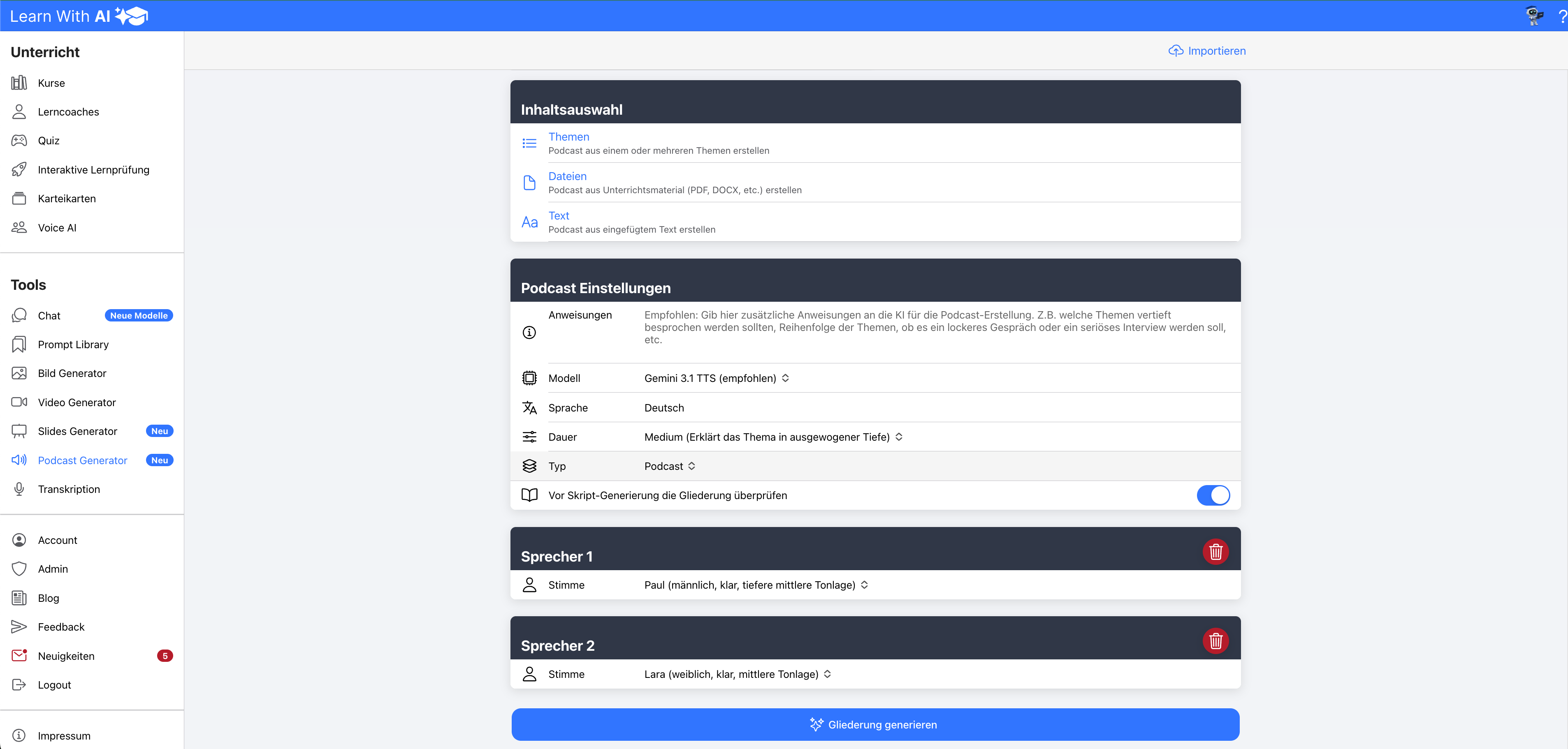
- Individual speaker selection: Users can choose up to 10 different speakers to optimally adapt the podcast and ensure that voice guidance is as natural as possible.
- Automated content creation with AI: The artificial intelligence from Learn-With.AI Can generate podcast scripts based on selected topics or uploaded teaching material.
- Easy to customize and edit: Before the content is finalized, it can be checked, edited and adapted as required — both in terms of content and in terms of voice and name.
- Manual podcast creation possible: If desired, podcast scripts can also be written completely manually in order to use individual content in a targeted manner.
- Lightning-fast generation: As soon as the content is defined, the podcast can be generated at the push of a button. Within 1-2 minutes The finished audio file is available.
Learn-With.AI Makes It Possible to Create Educational Podcasts efficient, professional and time-saving to create — without complex sound recordings or post-processing. Teachers, Schools and Learners Benefit from a Personalized learning resource that can be accessed at any time, which imparts knowledge in an appealing and flexible way. With Learn-With.AI, podcasting for education has never been easier!
Using Learn-With.AI in class
How can you use the podcast with other AI learning elements from Learn-With.AI?
- quiz: Based on your defined topics or uploaded teaching materials, you can easily create a quiz for your learners in Learn-With.AI — so they can directly check their knowledge and deepen it in a targeted manner.
- AI-powered learning coach: If you want your learners to further deepen their knowledge, you can give them a intelligent AI learning coach Provide, which answers questions individually and supports the learning process in a personalized way.
- Interactive learning test: Based on your defined topics or uploaded teaching materials, you can easily create a Create an interactive test for your learners. They can apply and deepen their knowledge directly while AI flexible to your answers Reacts: If the answers are certain, she delves into the topic; if there are uncertainties, she steers specifically to the next question. You decide whether the AI immediately detailed feedback There is or whether you do the evaluation yourself.
Subscribe to our newsletter so you don't miss any news!
Quick guide:
Step 1:
- Define the topic or upload your teaching materials
- With 'Info', you can optionally provide the AI with additional information that it should take into account when creating the content (e.g. focus).
- Define the speakers
- Click Generate podcast content

Step 2:
- Review the generated script and make adjustments if necessary
- Click Create podcast
- Download the file and share it with your students

.png)